XRG
- Best for
- macOS system monitoring
- License
- Free, Open Source
- Platforms
- macOS
- Pricing note
- No paid pricing was found on the official project page checked.

ThrottleStop is a Windows-focused CPU throttling and tuning utility for supported Intel systems. The closest alternatives are vendor tuning tools such as Intel XTU and AMD Ryzen Master, while many listed tools are better understood as monitoring, process limiting or core-parking utilities.
ThrottleStop is mainly used by Windows laptop users who want visibility into CPU throttling and, on supported Intel systems, more control over power, multiplier and voltage-related behavior. Alternatives vary widely: some tune CPU power plans, some limit individual processes, and others only monitor temperatures, clocks or utilization. Choose based on what you actually need: safer diagnostics, thermal monitoring, core parking controls, vendor-supported tuning, or per-process CPU limits.
ThrottleStop is a Windows utility associated with Kevin Glynn, also known as UncleWebb, and distributed through TechPowerUp. It is used to monitor and adjust CPU throttling behavior on many Intel-based laptops, including power-limit and performance profile settings where hardware and firmware allow it.
Users may compare alternatives when ThrottleStop does not support their CPU, when firmware blocks undervolting, when they want vendor-supported tuning, or when they only need monitoring rather than low-level CPU controls. Some users also prefer open-source tools, macOS or Linux options, or safer process-level CPU limiting.
ThrottleStop is commonly distributed as freeware, but users should verify the current download, license and bundled notes on TechPowerUp before installing.
CPU power, voltage and thermal settings can affect stability, battery life and hardware temperatures. Use official downloads, change one setting at a time, and avoid overriding thermal safeguards without adequate cooling.
Last updated: 2026-07-03
Source review records support this guide. Features, pricing, platform support, and availability can still change after publication.
Compare the product information currently available, then confirm current features, plans, and availability with each provider.
| Tool | Best for | License | Platforms | Pricing note | Official site |
|---|---|---|---|---|---|
| XRG | macOS system monitoring | Free, Open Source | macOS | No paid pricing was found on the official project page checked. | Official site for XRG |
| Cpulimit | Limit CPU usage per process | Free, Open Source, Commercial | Linux | Open-source project; no commercial pricing was found. | Official site for Cpulimit |
| Gatotray | Lightweight CPU tray monitor | Free | Linux | No paid pricing was found; license terms should be reviewed in the repository. | Official site for Gatotray |
| CPU-Z by CPUID | Identify CPU and platform details | Free | Windows, Android | CPU-Z is described by CPUID as freeware. | Official site for CPU-Z by CPUID |
| CPU-X | Linux and FreeBSD hardware profiler | Free, Open Source | Linux | Free and open-source software. | Official site for CPU-X |
| TrafficMonitor | Taskbar network and CPU monitor | Free, Open Source | Windows | No paid pricing was found in the official repository. | Official site for TrafficMonitor |
| CheckMyMac | Mac hardware monitoring | Paid | macOS | MacUpdate listed a paid price, but current official pricing was not verified. | Official site for CheckMyMac |
| AMD System Monitor | Legacy AMD resource monitor | Free | Windows | Older third-party listings describe it as free; current official availability was not verified. | Official site for AMD System Monitor |
| Compact Tray Meter | Windows tray resource meter | Free | Windows | The official page presents it as a compact utility; third-party listings describe it as freeware. | Official site for Compact Tray Meter |
| ParkControl | Tune CPU core parking | Freemium, Paid | Windows | Bitsum lists ParkControl as free with paid Pro license options. | Official site for ParkControl |
| MATE System Monitor | Linux process and resource monitor | Free, Open Source | Linux | Open-source desktop component; no paid pricing was found. | Official site for MATE System Monitor |
| AMD64 CPU Assistant | Legacy AMD K8 monitoring | Free | Windows | Older listings describe it as freeware; current official availability was not verified. | Official site for AMD64 CPU Assistant |
Options carrying a Free, Freemium, or Open Source label on this page include XRG, Cpulimit, Gatotray, CPU-Z by CPUID, CPU-X. Free access, usage limits, commercial-use terms, and paid features can change, so confirm current details with each provider.

Best for: macOS system monitoring
XRG is an open-source macOS system monitor for users who want quick visibility into CPU activity, GPU activity, memory, battery, machine temperature, network activity and disk I/O. It is useful for spotting load or heat trends on a Mac, but it does not replace ThrottleStop's low-level Intel CPU tuning controls.
Pricing: No paid pricing was found on the official project page checked.

Best for: Limit CPU usage per process
cpulimit is a command-line utility for limiting the CPU usage of a specific process on Linux. It is closer to a workload-control tool than a laptop undervolting utility, so it may fit batch jobs, background tasks or runaway processes rather than ThrottleStop-style CPU power tuning.
Pricing: Open-source project; no commercial pricing was found.

Best for: Lightweight CPU tray monitor
gatotray is a lightweight tray CPU monitor that displays usage, temperature and frequency in a compact graphical view. It can help Linux desktop users watch CPU behavior while troubleshooting performance or heat, but it is not a ThrottleStop-style undervolting or power-limit utility.
Pricing: No paid pricing was found; license terms should be reviewed in the repository.

Best for: Identify CPU and platform details
CPU-Z is CPUID's freeware system information tool for identifying CPU, motherboard, memory and graphics details, with real-time frequency readings. It is useful before choosing a tuning utility because it helps confirm hardware details, but it does not adjust throttling, voltage or power limits.
Pricing: CPU-Z is described by CPUID as freeware.

Best for: Linux and FreeBSD hardware profiler
CPU-X is a CPU-Z-like system profiling and monitoring tool for GNU/Linux and FreeBSD. It gathers CPU, motherboard and other hardware information through graphical, text and dump modes. It is useful for diagnostics and inventory, not for changing Intel laptop throttling behavior.
Pricing: Free and open-source software.

Best for: Taskbar network and CPU monitor
TrafficMonitor is a Windows desktop utility that shows network speed, CPU usage and RAM usage in a floating window or taskbar display. It is a practical lightweight monitor for everyday visibility, but it should be listed as a monitoring companion rather than a CPU throttling replacement.
Pricing: No paid pricing was found in the official repository.

Best for: Mac hardware monitoring
CheckMyMac appears to be a macOS hardware monitoring utility that tracks system components and temperature-related information. Because a current official developer site was not confidently verified, this item should be reviewed manually before being presented as a live ThrottleStop alternative.
Pricing: MacUpdate listed a paid price, but current official pricing was not verified.

Best for: Legacy AMD resource monitor
AMD System Monitor was a Windows utility for showing how AMD CPU and GPU resources were being used. It appears to be a legacy tool rather than a current AMD tuning product. For modern AMD processors, AMD Ryzen Master is usually the more relevant official utility to evaluate.
Pricing: Older third-party listings describe it as free; current official availability was not verified.

Best for: Windows tray resource meter
Compact Tray Meter is a small Windows tray utility that shows real-time CPU, RAM and disk activity near the system clock. It is useful for always-visible resource monitoring and quick hardware details, but it does not provide CPU voltage, throttling or power-limit controls.
Pricing: The official page presents it as a compact utility; third-party listings describe it as freeware.

Best for: Tune CPU core parking
ParkControl is a Windows utility from Bitsum for adjusting CPU core parking, frequency scaling and related power-plan behavior. It is relevant for users who want a safer, focused way to tune Windows power behavior, though it does not offer the same voltage and throttling controls as ThrottleStop.
Pricing: Bitsum lists ParkControl as free with paid Pro license options.

Best for: Linux process and resource monitor
MATE System Monitor is a process viewer and resource monitor for the MATE desktop. It shows CPU, memory, network and file system usage and lets users inspect or control running processes. It is useful for Linux diagnostics, but not for CPU undervolting or firmware-level tuning.
Pricing: Open-source desktop component; no paid pricing was found.

Best for: Legacy AMD K8 monitoring
AMD64 CPU Assistant is an old Windows monitoring utility aimed at AMD64 K8-era processors, with temperature, CPU usage, memory usage and CPU information features. It is unlikely to be a good modern ThrottleStop alternative and should be reviewed or deprecated before publishing.
Pricing: Older listings describe it as freeware; current official availability was not verified.

Best for: Throttle one process's CPU usage
Battle Encoder Shirasé, often shortened to BES, is a small Windows tool for throttling the CPU usage of a selected process. It can help keep a CPU-heavy background application from making the system unresponsive, but it is a per-process limiter rather than a CPU voltage or laptop throttling utility.
Pricing: No paid pricing was found on the official BES page checked.
Best for: CPU monitoring and parking controls
CPU Core Parking Manager 3 appears to have evolved into Quick CPU from CoderBag. Quick CPU provides CPU monitoring, performance tuning, stability testing and controls for core parking, frequency scaling and power-management behavior on supported Intel and AMD processors.
Pricing: Current pricing terms should be checked on the CoderBag download page before publishing.
Best for: Official Intel tuning and stress testing
Intel Extreme Tuning Utility, or Intel XTU, is Intel's Windows-based performance tuning software for supported Intel platforms. It combines overclocking, monitoring and stress testing, making it one of the closest official alternatives for users who want vendor-supported Intel CPU tuning.
Pricing: Intel provides the utility as a free download.
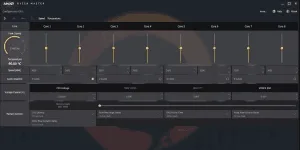
Best for: Official AMD CPU tuning
AMD Ryzen Master is AMD's official Windows utility for monitoring and tuning supported Ryzen and Threadripper processors. It provides real-time clock, temperature and voltage visibility and exposes performance controls for users working within AMD's supported ecosystem.
Pricing: AMD provides Ryzen Master as a free utility for supported processors.

Best for: Deep hardware monitoring
HWiNFO is a detailed hardware analysis, monitoring and reporting tool for Windows and DOS. It is not a tuning utility, but it is valuable for checking whether CPU clocks, temperatures, sensors and power behavior support a throttling diagnosis before changing settings elsewhere.
Pricing: Free downloads are available; review HWiNFO licensing for commercial use.
Best for: Open-source sensor monitoring
Open Hardware Monitor is a free open-source tool for monitoring temperature sensors, fan speeds, voltages, load and clock speeds. It fits users who want transparent hardware telemetry across Windows and some Linux setups, but it does not change CPU power limits.
Pricing: Free and open-source software.
Best for: Per-core CPU temperature monitoring
Core Temp is a compact Windows CPU temperature monitor focused on per-core readings and vital processor information. It is a narrow diagnostic alternative for users mainly trying to confirm thermal throttling or compare temperatures before and after changing power settings.
Pricing: Core Temp is presented as a free CPU monitoring utility; verify installer options before publishing.

Best for: Process priority and CPU responsiveness
Process Lasso is a Windows utility for process priority, CPU affinity, power-plan automation and responsiveness control. It does not undervolt a CPU, but it is relevant when the real problem is a CPU-heavy application making the system feel slow under load.
Pricing: Bitsum states Process Lasso is free to use indefinitely, with some advanced features tied to Pro.
The best option depends on your workflow, platform, budget, and required features. Options currently listed include XRG, cpulimit, gatotray.
Yes. Free, freemium, or open-source options in this list include XRG, cpulimit, gatotray, CPU-Z by CPUID, CPU-X.
The alternatives in this list include options for Windows, macOS, Android, Linux, depending on each product.
When reliable community signals are unavailable, the list should be read as a comparison set rather than a definitive ranking. Compare platform support, licensing, product details, and official provider information.
Alternative.tips is an independent alternatives directory. Product names, logos, pricing, features, and availability belong to their respective owners. Check the linked provider before downloading, subscribing, or purchasing.