MPC-HC
Lightweight Windows video player

VLC is a free, open source, cross-platform media player known for broad file, codec, disc, and stream support. The closest alternatives vary by need: mpv for minimal playback control, MPC-HC or MPC-BE for Windows, IINA for macOS, and Kodi or Jellyfin for home media setups.
Lightweight Windows video player
Customizable music library and audio playback
Desktop music library management
Classic music player with skins and plug-ins
PC and mobile video playback
Minimal, high-quality configurable playback
Home theater media center
VLC Media Player is a widely used free and open source player for local files, discs, devices, webcams, streams, and many common audio and video codecs. Alternatives are worth comparing when you want a more native interface, a simpler Windows-only player, a music-library focused app, mobile playback features, or a full media-center experience. Check official downloads first, because media players are often repackaged by third-party sites.
VLC Media Player is a cross-platform multimedia player from the VideoLAN project. It plays many media files, DVDs, Audio CDs, VCDs, devices, webcams, and network streams without requiring most users to install separate codec packs.
Some users prefer a lighter player, a macOS-native interface, better music library management, advanced subtitle workflows, HTPC-style browsing, or a mobile-first player. Others may need a tool that integrates with a media server or fits a specific operating system better than VLC.
VLC is free and open source. The VLC player is GPL-licensed, while libVLC uses LGPL terms; verify details for redistribution or embedded use.
Download VLC and alternatives from official sites or trusted app stores. Avoid codec-pack bundles, cracked installers, and sites that repackage media players with ads or unwanted extras.
Last updated: 2026-07-02
Source review records support this guide. Features, pricing, platform support, and availability can still change after publication.
Compare the product information currently available, then confirm current features, plans, and availability with each provider.
| Tool | Best for | License | Platforms | Pricing note | Links |
|---|---|---|---|---|---|
| Foobar2000 | Customizable music library and audio playback | Free | Windows, macOS, iOS, iPadOS, Android | Free download; check component terms before adding third-party extensions. | Official site for Foobar2000 |
| MPC-HC | Lightweight Windows video player | Free, Open Source | Windows | Free and open source under GPLv3. | Official site for MPC-HC |
| Winamp | Classic music player with skins and plug-ins | Free, Freemium | Windows, Android | Winamp desktop is described as freeware; creator and service features may have separate terms. | Official site for Winamp |
| Media Player Classic | Legacy Windows media player reference | Free | Windows | Free and open source under GPLv2, based on archived project metadata. | Official site for Media Player Classic |
| Clementine | Desktop music library management | Free, Open Source | Windows, macOS, Linux | Free software under GPLv3. | Official site for Clementine |
| PotPlayer | Feature-rich Windows video player | Free | Windows | Free download; proprietary terms should be checked on the official site. | Official site for PotPlayer |
| KMPlayer | PC and mobile video playback | Free, Freemium | Windows, macOS, iOS, iPadOS, Android | Free versions are available; some mobile premium features are offered separately. | Official site for KMPlayer |
| Amarok | KDE music player and collection manager | Free, Open Source | Linux | Free and open source; KDE lists Amarok under GPL-2.0+. | Official site for Amarok |
| SMPlayer | Graphical player using MPlayer and mpv | Free, Open Source | Windows, macOS, Linux | Free and open source under the GPL license. | Official site for SMPlayer |
| MPlayer | Legacy-capable media playback engine | Free | Windows, macOS, Linux | Open source under GPL-family licensing; verify specific builds and components. | Official site for MPlayer |
| Mpv | Minimal, high-quality configurable playback | Free, Open Source | Windows, macOS, Android, Linux | Free and open source; confirm license details for redistribution or embedding. | Official site for Mpv |
| GOM Player | Subtitle-friendly desktop and mobile player | Free, Freemium | Windows, macOS, iOS, iPadOS, Android | Free player available; GOMLab also sells licenses and paid products. | Official site for GOM Player |
Options carrying a Free, Freemium, or Open Source label on this page include Foobar2000, MPC-HC, Winamp, Media Player Classic, Clementine. Free access, usage limits, commercial-use terms, and paid features can change, so confirm current details with each provider.

Best for: Customizable music library and audio playback
foobar2000 is a strong VLC alternative when the main job is managing and playing a music library rather than watching video. It focuses on audio formats, gapless playback, ReplayGain, tagging, local network music, CD ripping, transcoding, and a highly customizable interface on desktop.
Pricing: Free download; check component terms before adding third-party extensions.

Best for: Lightweight Windows video player
MPC-HC is a Windows-focused alternative for users who want a traditional, lightweight desktop player with DirectShow flexibility. The maintained clsid2 fork adds modern fixes, HDR-related options, subtitle search, playback-speed controls, resume position, A-B repeat, and extensive keyboard shortcuts.
Pricing: Free and open source under GPLv3.

Best for: Classic music player with skins and plug-ins
Winamp is most relevant as a VLC alternative for music playback, playlists, skins, plug-ins, internet radio, CD ripping, and classic desktop audio-library workflows. It can also handle some video formats, but its strongest fit is still users who want the Winamp-style music experience.
Pricing: Winamp desktop is described as freeware; creator and service features may have separate terms.

Best for: Legacy Windows media player reference
Media Player Classic is a legacy Windows media player project rather than the best current install choice. It matters historically because MPC-HC and MPC-BE build on its design. For most users, the maintained MPC-HC or MPC-BE projects are safer recommendations than the old Guliverkli project.
Pricing: Free and open source under GPLv2, based on archived project metadata.

Best for: Desktop music library management
Clementine is an audio-player alternative for users who want library management, playlists, internet radio, and a desktop music app inspired by Amarok 1.4. It is not a full video player replacement for VLC, but it can be a practical choice when music organization matters more than video playback.
Pricing: Free software under GPLv3.

Best for: Feature-rich Windows video player
PotPlayer is a Windows media player aimed at users who want broad codec support, subtitle handling, hardware acceleration, 3D playback options, bookmarks, and detailed playback controls. It is a closer VLC substitute for Windows users than for people needing macOS, Linux, or mobile apps.
Pricing: Free download; proprietary terms should be checked on the official site.

Best for: PC and mobile video playback
KMPlayer is a media player family for PC and mobile users who want format support, high-resolution playback, subtitles, speed control, bookmarks, network/cloud playback, and mobile transfer features. It is worth comparing with VLC when interface and device-specific features matter.
Pricing: Free versions are available; some mobile premium features are offered separately.

Best for: KDE music player and collection manager
Amarok is a KDE music player and collection manager, not a general video player. It fits users comparing VLC for local music libraries, dynamic playlists, ratings, iPod/MTP device support, cover management, ReplayGain, scripting, and integrated music services.
Pricing: Free and open source; KDE lists Amarok under GPL-2.0+.

Best for: Graphical player using MPlayer and mpv
SMPlayer wraps MPlayer and mpv in a more traditional graphical interface. It is a practical VLC alternative for users who want built-in codecs, resume-per-file settings, subtitle search/download, playback filters, skins, YouTube support, and a familiar Windows/Linux desktop player.
Pricing: Free and open source under the GPL license.

Best for: Legacy-capable media playback engine
MPlayer is a long-running open source media player and playback engine that influenced several other players, including SMPlayer and mpv. It is most relevant for technical users or legacy setups; mainstream desktop users may prefer SMPlayer, mpv, MPC-HC, or VLC for easier current packaging.
Pricing: Open source under GPL-family licensing; verify specific builds and components.

Best for: Minimal, high-quality configurable playback
mpv is a minimalist, scriptable, open source player for users who value playback quality, GPU video output, hardware decoding, configuration files, and keyboard-driven control. It has a small on-screen controller rather than a full library interface, so it suits advanced users more than casual library browsing.
Pricing: Free and open source; confirm license details for redistribution or embedding.

Best for: Subtitle-friendly desktop and mobile player
GOM Player is a free video player for Windows, macOS, Android, and iOS with broad format support, external codec help, 360-degree VR playback, repeat sections, simple skins, and subtitle-related tools. It is a reasonable VLC comparison for users who prefer GOM's interface and subtitle workflow.
Pricing: Free player available; GOMLab also sells licenses and paid products.

Best for: Mobile video playback, especially Android
MX Player is mainly relevant as a mobile VLC alternative, especially on Android, where it is known for hardware acceleration, subtitle support, and multi-core decoding. The brand also has streaming-service use, so editors should distinguish the local video player app from Amazon MX Player entertainment content.
Pricing: The Android app is free with ads; Pro and regional availability should be rechecked.

Best for: Maintained Windows Media Player Classic fork
MPC-BE is a maintained Windows player based on Media Player Classic and MPC-HC. It is a good VLC alternative for users who want a compact Windows interface, hardware decoding, deinterlacing, ISO image mounting, and a familiar desktop player without moving to a media-center app.
Pricing: Free and open source under GPLv3.

Best for: Modern macOS media player
IINA is a macOS-native player built around mpv. It is a strong VLC alternative for Mac users who want a modern interface, system media controls, Touch Bar support, picture-in-picture style workflows, gestures, online subtitles, plugin support, and playback of many local or online media formats.
Pricing: Free and open source under GPLv3.
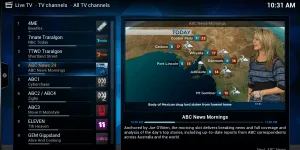
Best for: Home theater media center
Kodi is a media-center application rather than a simple file player. It is useful for people who want a TV-friendly interface, remote-control navigation, local or network media libraries, podcasts, music, videos, and add-ons. It is best framed as a home-theater alternative to VLC, not as a lightweight desktop player.
Pricing: Free and open source under GPL-family licensing.

Best for: Desktop client for Jellyfin media servers
Jellyfin Media Player is an official desktop client for Jellyfin servers. It combines Jellyfin's web-style interface with mpv-based playback, making it useful for users who store media on a home server and want richer desktop playback than a browser tab. It is not a standalone local-file player like VLC.
Pricing: Jellyfin states its server and official clients are free to download and use.

Best for: Apple-device video player
Infuse is an Apple-focused video player for iPhone, iPad, Apple TV, Mac, and Apple Vision. It is relevant for users who want polished playback of local and network video libraries, broad format support, subtitles, AirPlay, Trakt sync, and Apple-device integration instead of VLC's more utilitarian interface.
Pricing: Free download with optional Pro features or subscription; verify regional App Store pricing.

Best for: Personal media server and streaming apps
Plex is useful when users want to organize a personal media server and stream that library through desktop, mobile, TV, and browser apps. It is not a direct VLC replacement for opening one local file, but it belongs on a VLC alternatives page for home media libraries and multi-device playback.
Pricing: Core apps are free for many uses; Plex Pass unlocks additional paid features.
The best option depends on your workflow, platform, budget, and required features. Options currently listed include foobar2000, MPC-HC, Winamp.
Yes. Free, freemium, or open-source options in this list include foobar2000, MPC-HC, Winamp, Media Player Classic, Clementine.
The alternatives in this list include options for Windows, macOS, iOS, iPadOS, Android, Linux, depending on each product.
When reliable community signals are not available, the list should be read as a comparison set rather than a definitive ranking. Compare platform support, licensing, product details, and official provider information.
Alternative.tips is an independent alternatives directory. Product names, logos, pricing, features, and availability belong to their respective owners. Check the linked provider before downloading, subscribing, or purchasing.