FileZilla
Cross-platform FTP, FTPS and SFTP transfers.

WinSCP is a free Windows client for SFTP, FTP, FTPS, SCP, WebDAV and S3, with scripting, synchronization, remote editing and file-manager features.
Cross-platform FTP, FTPS and SFTP transfers.
Mac and Windows client for FTP, SFTP, WebDAV and cloud storage.
macOS remote connection manager with file transfer support.
Mount cloud storage, SFTP and FTP as native drives.
Open-source dual-pane file manager with remote filesystem support.
Native macOS file transfer client with FTP, SFTP and cloud support.
Free FTP/SFTP and cloud transfer client across desktop and mobile.
Lightweight Windows client for WebDAV, FTP, SFTP and cloud storage.
WinSCP is a free, open-source file manager and file transfer client for Windows. It is widely used for moving files between a local computer and remote servers over SFTP, FTP, FTPS, SCP, WebDAV and S3. Alternatives are worth comparing when you need macOS or Linux support, a simpler FTP client, mounted cloud drives, mobile access, integrated SSH terminals, or team-oriented remote connection management.
WinSCP is a Windows application for secure file transfer, remote file editing, directory synchronization, scripting, and basic remote file management. It is especially common in web hosting, server administration, deployment, backup, and automation workflows.
Users may compare alternatives when they need native macOS or Linux apps, a more modern interface, cloud drive mounting, mobile SFTP access, integrated terminal sessions, team credential management, or commercial support. Some older FTP clients on this page also need review because they appear outdated or discontinued.
WinSCP is free software under the GNU GPL. Some alternatives are open source, while others use trial, freemium, perpetual, or subscription licensing.
Download transfer tools only from official sites or trusted app stores, verify host keys, prefer SFTP/FTPS over plain FTP, and avoid unmaintained clients for sensitive credentials.
Last updated: 2026-07-02
Source review records support this guide. Features, pricing, platform support, and availability can still change after publication.
Compare the product information currently available, then confirm current features, plans, and availability with each provider.
| Tool | Best for | License | Platforms | Pricing note | Links |
|---|---|---|---|---|---|
| FileZilla | Cross-platform FTP, FTPS and SFTP transfers. | Free, Open Source | Windows, macOS, Linux | The standard FileZilla Client is free; FileZilla Pro is a separate paid product. | View guide for FileZilla |
| FileZilla Secure | Possibly obsolete or unofficial FileZilla-related listing. | Free | Windows, macOS | Unable to verify current pricing or licensing from an official source. | View guide for FileZilla Secure |
| Cyberduck | Mac and Windows client for FTP, SFTP, WebDAV and cloud storage. | Free, Open Source | Windows, macOS | Free software; official store purchases and donations help support development. | Official site for Cyberduck |
| Transmit | Native macOS file transfer client with FTP, SFTP and cloud support. | Trial, Commercial, Paid | macOS | Official site lists a free trial and paid unlock; verify current price before publishing. | Official site for Transmit |
| muCommander | Open-source dual-pane file manager with remote filesystem support. | Free, Open Source | Windows, macOS, Linux | Free and open source. | Official site for muCommander |
| FireFTP | Legacy browser extension for FTP and SFTP. | Free | Windows, macOS, Linux | Historically free; current maintenance status should be reviewed. | Official site for FireFTP |
| ForkLift | macOS dual-pane file manager and transfer client. | Trial, Commercial, Paid | macOS | Official site offers a trial and paid purchase options; verify current price. | Official site for ForkLift |
| Bitvise SSH Client | Windows SSH client with graphical and command-line SFTP. | Free | Windows | Bitvise states that the SSH Client can be used free of charge in all environments. | Official site for Bitvise SSH Client |
| trolCommander | Cross-platform dual-pane file manager forked from muCommander. | Free, Open Source | Windows, macOS, Linux | Listed by the project as free and open source. | Official site for trolCommander |
| PAC Manager | Legacy Linux GUI connection manager for SSH and Telnet workflows. | Free | Linux | SourceForge listing describes it as GPL software. | Official site for PAC Manager |
| CarotDAV | Lightweight Windows client for WebDAV, FTP, SFTP and cloud storage. | Free | Windows | Official page describes the client as free of charge. | Official site for CarotDAV |
| FlashFXP | Windows FTP, FTPS, SFTP and FXP transfer client. | Trial, Commercial | Windows | Pricing and license status should be manually verified on the official site. | Official site for FlashFXP |
Options carrying a Free, Freemium, or Open Source label on this page include FileZilla, FileZilla Secure, Cyberduck, muCommander, FireFTP. Free access, usage limits, API limits, hosting limits, commercial-use terms, and paid features can change, so confirm current details with each provider.

Best for: Cross-platform FTP, FTPS and SFTP transfers.
FileZilla Client is a widely used cross-platform FTP client for FTP, FTPS and SFTP. It is a practical WinSCP alternative when you want a familiar two-pane transfer interface on Windows, macOS or Linux. Users who need cloud-storage protocols should separately evaluate FileZilla Pro rather than assuming the free client includes every cloud feature.
Pricing: The standard FileZilla Client is free; FileZilla Pro is a separate paid product.

Best for: Possibly obsolete or unofficial FileZilla-related listing.
This entry should be manually reviewed before publishing as a recommended alternative. It does not appear to be the current official FileZilla Client, and the existing description reads like an old third-party or repackaged listing. Use the official FileZilla Client entry instead unless a safe, current official source can be verified.
Pricing: Unable to verify current pricing or licensing from an official source.

Best for: Mac and Windows client for FTP, SFTP, WebDAV and cloud storage.
Cyberduck is a libre server and cloud storage browser for macOS and Windows. It supports FTP, SFTP, WebDAV, S3, Backblaze B2, Azure, Google Drive, Dropbox and other storage services, making it a good WinSCP alternative for users who want a broader cloud-storage client without moving to a full remote administration suite.
Pricing: Free software; official store purchases and donations help support development.

Best for: Native macOS file transfer client with FTP, SFTP and cloud support.
Transmit is Panic's macOS file transfer client for FTP, SFTP, WebDAV, S3 and many cloud services. It is relevant for Mac users who like WinSCP's file-transfer role but want a polished native macOS interface, drag-and-drop workflows and cloud-service connections. It is commercial software, so compare its license terms before choosing it.
Pricing: Official site lists a free trial and paid unlock; verify current price before publishing.

Best for: Open-source dual-pane file manager with remote filesystem support.
muCommander is an open-source dual-pane file manager that runs on major desktop operating systems with Java support. It is not a direct clone of WinSCP, but it can suit users who want a keyboard-friendly file manager with local and remote file-system support across Windows, macOS and Linux.
Pricing: Free and open source.

Best for: Legacy browser extension for FTP and SFTP.
FireFTP was a browser-based FTP/SFTP client originally built for Firefox and later associated with Waterfox. It may be useful only for users researching legacy workflows. Because modern Firefox removed support for the extension model FireFTP relied on, it should not be promoted as a primary current WinSCP alternative.
Pricing: Historically free; current maintenance status should be reviewed.

Best for: macOS dual-pane file manager and transfer client.
ForkLift is a macOS dual-pane file manager and file transfer client. It supports remote connections such as SFTP and FTP and is a strong fit for Mac users who want file management, transfer tasks and server browsing in one native app. It is not for Windows users looking for a direct WinSCP replacement.
Pricing: Official site offers a trial and paid purchase options; verify current price.
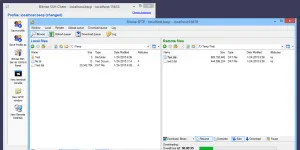
Best for: Windows SSH client with graphical and command-line SFTP.
Bitvise SSH Client is a Windows SSH client with terminal access, graphical and command-line SFTP, tunneling and an FTP-to-SFTP bridge. It is a good WinSCP comparison point for administrators who need both secure file transfer and SSH session management rather than only a standalone transfer window.
Pricing: Bitvise states that the SSH Client can be used free of charge in all environments.

Best for: Cross-platform dual-pane file manager forked from muCommander.
trolCommander is a fork of muCommander with a dual-pane, tabbed file-manager interface. It can be considered by users who prefer a Java-based cross-platform file manager rather than a dedicated SFTP client. Before publishing it prominently, verify current builds, platform packages and whether its remote protocol support matches the page's needs.
Pricing: Listed by the project as free and open source.

Best for: Legacy Linux GUI connection manager for SSH and Telnet workflows.
PAC Manager is an older Linux connection manager for SSH, Telnet and related remote sessions, rather than a modern general-purpose FTP client. It may be historically relevant for Linux administrators, but its SourceForge listing and third-party notes suggest it should be reviewed carefully before being shown as a current WinSCP alternative.
Pricing: SourceForge listing describes it as GPL software.

Best for: Lightweight Windows client for WebDAV, FTP, SFTP and cloud storage.
CarotDAV is a simple Windows client for WebDAV, FTP, SFTP and several online storage services. It can be useful when a user wants a lightweight Windows transfer tool focused on WebDAV-style storage rather than the broader scripting and synchronization features that make WinSCP popular.
Pricing: Official page describes the client as free of charge.

Best for: Windows FTP, FTPS, SFTP and FXP transfer client.
FlashFXP is a Windows FTP, FTPS, SFTP and FXP client known for site-to-site transfer workflows. It may still be relevant for users with established FlashFXP setups, but public information suggests its release history is old. Review the official download, licensing and maintenance status before ranking it highly.
Pricing: Pricing and license status should be manually verified on the official site.

Best for: macOS remote connection manager with file transfer support.
Royal TSX is a macOS remote management client for organizing connections such as RDP, VNC, SSH and file transfer sessions. It is broader than WinSCP and is best compared by system administrators who need a connection manager with credential handling, plugins and team workflows, not just a dedicated FTP/SFTP client.
Pricing: Royal Apps uses free and paid licensing options; verify current license model before publishing.

Best for: Commercial Windows transfer client with FTP, SFTP, WebDAV and cloud support.
SmartFTP is a Windows client for FTP, FTPS, SFTP, WebDAV, S3, Backblaze B2, Google Drive, OneDrive, SSH and terminal workflows, with features split by edition. It is a relevant WinSCP alternative for Windows users who want a commercial transfer client with cloud and terminal options.
Pricing: SmartFTP uses paid editions; verify the edition needed for each protocol.
Best for: Free FTP/SFTP and cloud transfer client across desktop and mobile.
FTP Rush is a free file transfer client for desktop and mobile platforms. It supports FTP/SFTP plus cloud storage services such as Google Drive, Dropbox, OneDrive and Amazon S3. It can be useful when WinSCP feels too Windows-specific and a user wants a similar transfer workflow across more devices.
Pricing: Official page presents FTP Rush as free file transfer software.

Best for: Legacy macOS FTP, SFTP and WebDAV client.
Yummy FTP Pro was a macOS FTP/SFTP/WebDAV client known for transfer automation and a Mac-like interface. It should be treated as a legacy entry: public information indicates the project is no longer actively maintained and may not work on modern macOS versions. Consider replacing it with current Mac options such as Transmit, ForkLift or Commander One.
Pricing: Current pricing could not be confidently verified from an active official source.

Best for: Legacy Linux and Unix-like FTP client.
gFTP is a free multithreaded FTP client mainly associated with Unix-like systems and Linux desktop environments. It is relevant for historical Linux FTP workflows, but the project appears dormant. For a current recommendations page, it should be kept only with a clear maintenance warning or replaced by actively maintained clients.
Pricing: Open-source GPL project; no current paid pricing found.

Best for: Legacy Windows FTP, SFTP and WebDAV client.
BitKinex was a Windows file transfer client for FTP, SFTP and WebDAV-style workflows. The existing page already notes that development stopped long ago, and current official product information is difficult to verify. It should not be presented as a current safe recommendation without manual review.
Pricing: Historical freeware status appears likely, but current official licensing was not verified.
Best for: Mount remote SFTP filesystems locally.
SSHFS is a filesystem client that mounts a remote server over SFTP, letting files appear inside the local filesystem. It is not a graphical FTP client, but it is highly relevant for users who prefer mounting remote directories instead of dragging files through a transfer window. It fits technical Linux and FUSE-based workflows.
Pricing: Open-source GPL project.

Best for: Legacy platform-independent transfer client for FTP/S, SFTP and WebDAV/S.
AnyClient was a platform-independent file transfer client from JSCAPE with support for FTP/S, SFTP, WebDAV/S, Amazon S3 and related protocols. Public official references are old, so it should be reviewed before being shown as a live current alternative. It may be better treated as a legacy enterprise file-transfer client.
Pricing: Historical JSCAPE posts describe it as free; current availability is unclear.
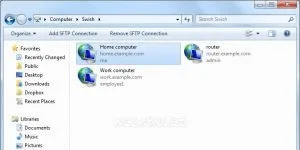
Swish-SFTP access to your files on another computer via the Windows Explorer secure SSH provides support. Work with remote files seamlessly with Windows Explorer, only updates, which feels on your local computer as working with Swish is easy to use. For Windows users, WinSCP is very easy to use, because we believe Swish is a better option than typical. Download it now and decide for yourself. Features:Free,Open,Source,Windows

AndFTP is a FTP client for Android devices. Allows you to manage several FTP servers. Each device comes with a file browser and a FTP file browser. Resume support with download and installation features. Use device menu to rename, delete, copy, set permissions and create folders. Features:Free,Android

Just a Gigolo GIO/GVfs frontend to manage connections to remote file systems. Fast/manage bookmarks, and a connection to a remote Mount. The project is part of the Turkish beauties, Turkish no hard dependencies and can be used in other desktop environments, but the Turkish Server is hosted. Only hard dependency (2.12 or later), GTK2. Features:Free,Open,Source,Linux

READY node.js internal FTP /SFTP - server with your Git repository, by comparison with the version of the deployment tool Loads the latest changes. Features:Free,Open,Source,Mac,Windows,Linux,BSD,Node.JS

bareFTP (SFTP), FTP (FTPS) SSL /TLS and SSH File Transfer Protocol " is a file transfer client with support for FTP. Written in C# Mono framework and the GNOME desktop environment. bareFTP is free and open source software under the GPL license. Features:Free,Open,Source,Linux
Best for: Mount SFTP, WebDAV, S3 and cloud storage as local disks.
Mountain Duck mounts server and cloud storage as a disk in Finder on macOS and File Explorer on Windows. It is useful for people who like WinSCP's transfer protocols but prefer working with remote files through the operating system file manager instead of a separate transfer client.
Pricing: Official site offers a trial and paid registration key; verify current price.

Best for: Mount cloud storage, SFTP and FTP as native drives.
ExpanDrive mounts cloud storage and remote protocols such as SFTP, FTP and S3 as native drives on macOS, Windows and Linux. It is a relevant alternative when users want remote files to behave like local files, especially across several cloud providers and operating systems.
Pricing: Official pricing says personal use is free; team and enterprise plans are paid.

Best for: macOS dual-pane file manager with FTP, SFTP and cloud support.
Commander One is a dual-pane macOS file manager with FTP, SFTP, WebDAV, cloud drive and archive features. It is a natural addition for Mac users comparing WinSCP-like transfer workflows but wanting a broader Finder-style file manager rather than a Windows-only application.
Pricing: Free mode exists; PRO features require a paid upgrade.

Best for: Command-line sync and mount tool for cloud and remote storage.
rclone is a command-line tool for managing and syncing files across many cloud storage providers and standard protocols. It is not a GUI replacement for WinSCP, but it is very relevant for technical users who want scriptable transfers, mounts, sync jobs and automation across SFTP, WebDAV, S3 and many cloud remotes.
Pricing: Free and open source.
Best for: Free Windows FTP client with SFTP and FTPS support.
Core FTP LE is a free Windows FTP client that includes SFTP, FTPS, TLS/SSL, site-to-site transfers, resume support, drag and drop, filters and command-line transfers. It is a useful simpler Windows alternative for people who mainly need classic FTP/SFTP website file management.
Pricing: Core FTP LE is presented as free Windows client software.
Best for: Windows remote access suite with SSH terminal and SFTP browser.
MobaXterm is a Windows remote access suite with SSH, tabbed terminal sessions and an automatic graphical SFTP browser. It is broader than WinSCP, but it is a good suggestion for users who want terminal access, remote network tools and file transfers in one Windows application.
Pricing: Home Edition is free; Professional Edition is paid for business-focused features.
Best for: Cross-platform SSH client with SFTP file management.
Termius is a modern cross-platform SSH client with SFTP support, host management and encrypted vault features. It is most relevant for users who need SSH and SFTP access across desktop and mobile devices rather than a classic desktop-only FTP client.
Pricing: Free plan is available; paid plans add more advanced features.
The best option depends on your workflow, platform, budget, and required features. Options currently listed include FileZilla, FileZilla Secure, Cyberduck.
Yes. Free, freemium, or open-source options in this list include FileZilla, FileZilla Secure, Cyberduck, muCommander, FireFTP.
The alternatives in this list include options for Windows, macOS, iOS, iPadOS, Android, Linux, depending on each product.
When reliable community signals are not available, the list should be read as a comparison set rather than a definitive ranking. Compare platform support, licensing, product details, and official provider information.
Alternative.tips is an independent alternatives directory. Product names, logos, pricing, features, and availability belong to their respective owners. Check the linked provider before downloading, subscribing, or purchasing.